

FAQ.
Find answers to common questions about eLUXE3D scanners, support, setup, and more.
How much time does it take to scan a standard engagement ring?
An engagement ring would take about 10-12 minutes. Depending on the texture of the physical model, you would need to prep the model with either 3D scan spray or air brush to get the reflectivity off the item being scanned. Scanning, post processing and exporting the STL file would take 8-10 minutes depending on the complexity of the ring and what the designer is trying to accomplish with the STL scan model.
Do I have to spray the physical pieces and why?
Some pieces do need to be sprayed with a light washable coat in order to reduce / remove high reflectivity. The technology is camera based, if the object is too reflective, transparent or translucent, the cameras cannot fully see the object. This can cause bad data or no data. We have developed our own 3D Scan Spray specifically designed for jewelry that evaporates on its own in about 15-20 minutes. Our 3D scanning spray can be purchased at JewelryScanSpray.com
Does it take longer to scan a more complex piece?
Complex pieces can take a little bit longer to scan. The scanning process is the same, but you will physically orient the model in multiple positions. The scanning software will align all the orientations in a single, final model.
What is the largest size piece that can be scanned with the eLUXE3D scanners?
The eLUXE3D Platinum 3D scanner has a dynamic field of View allowing users to select object size for scanning.
The largest object that can be scanned in a single orientation is 120mm x 95mm.
How automated is the scanning process?
The scanning process is very automated. The software is fully macro based, using short or long macros that rotate and tilt the object while it scans. The platform that the object sits on is a 2 axis platform that has full 360 degree rotation and 135 degree swing.
Does the eLUXE3D scanner recognize different parts of the ring? Metal and Stones?
The scanner does not recognize different parts. The STL that is generated will contain all the pieces that it sees. There are tools that allow the user to manually isolate stones from metal. Typically the STL is imported into CAD software where the jeweler or jewelry designer can use 3D information for rebuilding or reverse engineering the piece of jewelry.
Can I edit the STL model that is exported?
The exported file will be an STL or OBJ file. This is a polygonal mesh not a CAD model. There are several ways the mesh file can be used. ZBRUSH has the ability to modify the STL file directly. CAD software like Rhino, Matrix and 3SHAPER have the ability extract features, curves and generate NURBS on top of the STL. Refer to the eLUXE3D video library for examples of how STL data is used once exported. https://eluxe3d.com/learn/
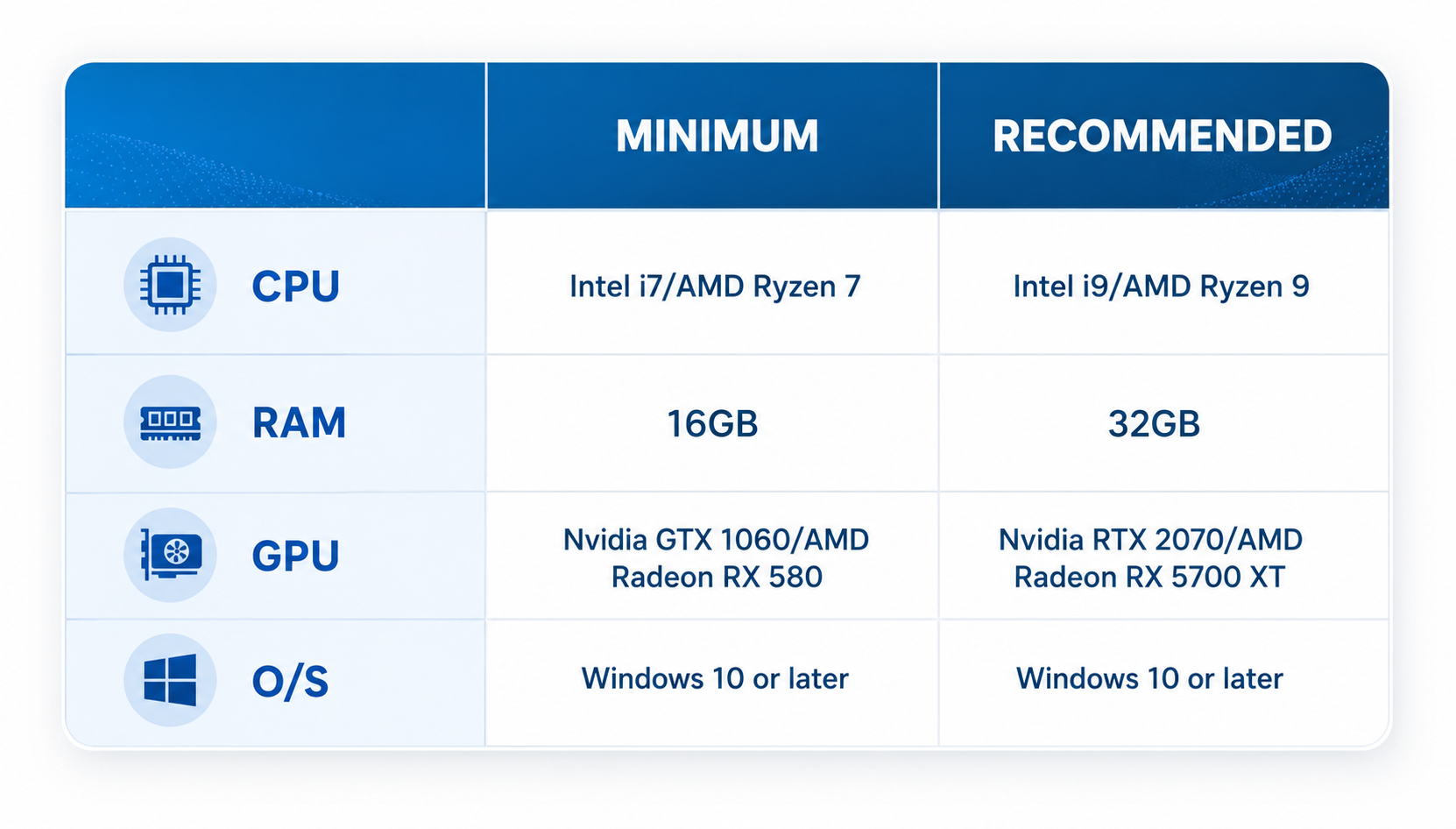
What are system requirements for the eLUXE3D scanners?
Questions about this FAQ?
If you have any questions or concerns about this FAQ, you may contact us at: